Riverside Transcription online
We proudly provide a transcription tool for Riverside, CA. Convert your audio and video to text in seconds—lightning-fast and highly accurate. No sign-up, no credit card required. Try it for free.


Drag files here or click to browse
How to Get Transcription Results
Six Key Features of Our Riverside Transcription

High Accuracy
Boasts an overall accuracy rate of over 96%.

Multiple Language Support
Capable of transcribing 100+ languages, breaking down language barriers.

Long Duration Support
Handles audio and video files of up to 10 hours in length.

Large File Processing
Supports file sizes up to 5GB for transcription.

Speaker Identification
Can distinguish between up to 20 unique speakers.

Intelligent Structuring
Automatically segments paragraphs and adds punctuation.
Riverside Transcription User Guide
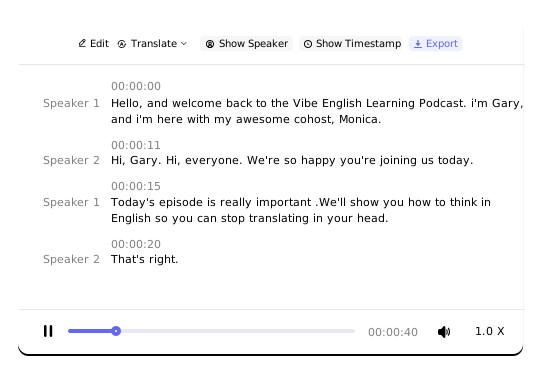
Riverside Transcription allows you to transcribe video files, audio files, and media links. Once transcribed, you can view, edit, translate, and export the text online.
- Supported video file formatsMP4, MOV, WMV, and MPEG
- Supported audio file formatsMP3, M4A, AAC, WAV, OGG, OPUS, FLAC, MPEG, WMA
- Supported media platforms for linksYouTube, Facebook, X, Dropbox, Google Drive, Vimeo, TikTok, Instagram, and more.
- Available export/download formats for textTXT, PDF, DOCX, SRT, CSV, VTT, and others.
Try Transcription for Free
Drag files here or click to browse
Riverside Transcription
As a vibrant city, Riverside, California, faces a growing need for efficient information organization in public services, business development, and cultural activities. Leveraging advanced AI transcription technology, we provide local users with convenient and reliable audio/video-to-text support. Our core services include:
- Public Sector Documentation: We provide government agencies and administrative bodies with accurate textual records of meetings, interviews, and more, facilitating easy archiving and sharing.
- Education & Academic Use: We support schools, research teams, and training institutions by transcribing classroom recordings, lectures, and interviews, enhancing learning and research efficiency.
- Business & Corporate Scenarios: We assist various enterprises by quickly transcribing meeting minutes, market research, call recordings, and other audio/video content, helping to streamline workflows.
- Cultural & Community Event Documentation: We transform local events, artistic performances, media content, and more into readable, preservable text documents.
Utilizing cutting-edge AI technology, our service supports transcription in 100+ languages and translation into 249 languages, delivering an efficient, accurate, and flexible professional transcription experience for users in Riverside.
Powered by AI

Fast and Accurate
Leveraging powerful AI technology, we ensure high accuracy while maximizing transcription speed to minimize your wait time.

Wide Language Coverage
Supports transcription in 100+ languages, including various regional dialects and colloquial speech.

Built-In Translation
Transcribed text can be translated into 249 languages, completely breaking down language barriers.

Speaker Identification
Accurately distinguishes between speakers, supporting up to 20 unique voices—ideal for lectures, meetings, interviews, podcasts, and more.

Word-Level Timestamps
Intelligently segments text and syncs each word precisely with its position in the audio.

Private and Secure
Your data is encrypted and accessible only to you. It is used solely for transcription—never for any other purpose.
Reviews

FAQ
How do I complete a transcription?
First, upload your audio/video file or paste a media link. Then, click the "Transcribe" button to start the process. Once transcription is finished, you’ll receive the text.
How fast is the transcription?
Transcription typically takes about 1/20 to 1/10 of the file’s duration. For example, a 1‑hour audio file will be transcribed in approximately 3–5 minutes.
How accurate is the transcription?
Our overall accuracy rate exceeds 96%. Please note that transcription quality depends largely on audio clarity — background noise, interference, or music may affect the results. We work hard to deliver the most accurate text possible.
Can I convert audio/video to a Word document?
Yes, definitely. Once your text is transcribed, simply export it in DOCX format.
Can audio/video be converted into subtitles?
Yes. You can export the transcribed text in SRT format to generate subtitle files.