Convert MP3 to Text:
Online Audio Transcription Tool
Convert your MP3 files to text instantly with our powerful AI — fast, accurate, and completely free. No signup required. Supports multiple languages. Try it now!
Drag files here or click to browse
Three Simple Steps to Transcribe MP3 into Text
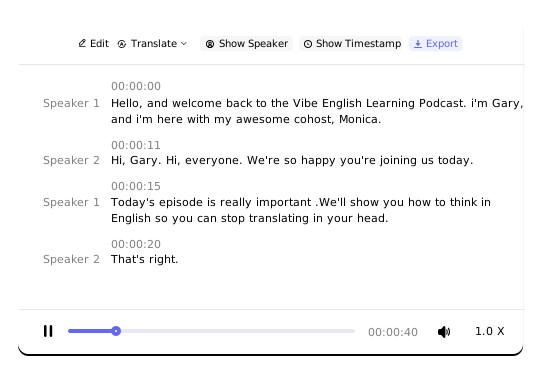
- With this tool, you can convert MP3 files into text online, generating highly accurate, searchable, editable, and exportable transcripts—whether for podcast recordings, meetings, lectures, or interviews. Enjoy a seamless and efficient transcription experience on a professional, user-friendly platform.
- Simply upload an MP3 file to quickly obtain the results you need, significantly saving time and effort.
- It supports transcription for over 100 languages, including English, Spanish, Japanese, German, French, Italian, and more, along with translation support for 249 languages. Features such as speaker diarization, speaker labeling, and timestamps are also provided to ensure precise transcription every time.
Top 3 Features You Should Know
About Our MP3 Transcription Tool
- 1Long Audio TranscriptionIt can transcribe MP3 files of up to 10 hours in length, eliminating the need to split or segment your audio.
- 2Large File ProcessingSupports files as large as 5 GB, handling even the most demanding audio processing tasks with ease.
- 3Speaker RecognitionCapable of identifying up to 20 distinct speakers, making it ideal for meetings, discussions, interviews, and other multi-speaker scenarios.
Why Choose Our Product?

Industry-Leading Accuracy
Achieve transcription accuracy of over 96%—even with lower-quality audio recordings.

Lightning-Fast Transcription
Get your transcript in just seconds, significantly reducing waiting time.

Speaker Recognition
Automatically identify multiple speakers, making content clearer and easier to follow.

Multilingual Support
Recognize and transcribe over 100 languages, enabling seamless cross-language use.

Lightweight Web Platform
No registration, login, app downloads, or extensions required—just click and start transcribing.

Privacy & Security
We protect your privacy. Your MP3 files are used solely for transcription and for no other purpose.
Who Can Take the Most Advantage of
MP3-to-Text Conversion?

Working Professionals
Easily convert meetings, client interviews, and training sessions into editable text, saving time on note-taking and organization.

Content Creators
Quickly generate scripts or subtitles from podcasts, interviews, or recorded talks, boosting your content production efficiency.

Students & Researchers
Effortlessly organize notes and materials from lectures, academic talks, or research interviews.

Businesses & Teams
Consistently transcribe meetings, workshops, and training sessions for easy archiving, sharing, and analysis.
What You Get with Our Product
- Break Down Language BarriersEasily learn from audio content worldwide or expand your content's reach to a global audience, building influence across borders.
- Enhance AccessibilityProvide detailed, accurate transcripts with timestamps and speaker identification so that people with hearing impairments can access audio content freely and easily.
- Make the Most of Your MP3 ContentTurn MP3 files into text for long-term study materials, or repurpose them into blog posts, podcast scripts, video captions, and more—unlocking new value from your recordings.
How to Build an MP3 Transcription Workflow from Scratch
- 1Prepare Your Recording Environment in AdvanceChoose a quiet setting and maintain a consistent microphone distance to ensure clear audio, laying a solid foundation for accurate transcription.
- 2Upload Your MP3 File for Automatic TranscriptionImport your audio into our platform to generate precise text transcripts effortlessly.
- 3Quickly Proofread and Clean Up the TextReview the transcript, check proper nouns, remove filler words, and improve paragraph structure for better readability.
- 4Generate a Summary or Key TakeawaysUse automated summarization to extract main points, transforming long recordings into quick-reference notes.
- 5Export and Save Your Final ResultsExport the polished text with one click, then save and organize it using consistent naming conventions to build reusable knowledge assets.
Key Questions About MP3 to Text Conversion
How do I transcribe an MP3 to text?
To transcribe an MP3, simply upload your audio file, start the transcription process, and download the transcript in your preferred format once completed.
Do you support formats other than MP3?
Yes, we do. Our platform also supports audio formats such as M4A, AAC, WAV, OGG, OPUS, FLAC, MPEG, and WMA, as well as video formats like MP4, MOV, WMV, and MPEG, providing an all-in-one solution for your audio and video files.
What is your highest transcription accuracy?
Our overall transcription accuracy exceeds 96%. However, results can vary depending on audio quality factors such as background noise or interference. Clearer, higher-quality audio typically yields more accurate transcripts.
Can you accurately identify multiple speakers in an MP3 recording?
Absolutely. Our tool can recognize up to 20 distinct speakers, making it well-suited for meetings, interviews, and multi-speaker scenarios.
How fast is the transcription process?
Most files are transcribed in a matter of seconds. Longer recordings may require additional time based on their duration.
Can I edit the transcribed text?
Yes, you can edit the text directly online. Each word in the transcript remains synchronized with the corresponding segment of the original MP3 audio for easy reference.
Can I translate the transcribed text into other languages?
Yes. Once transcription is complete, you can use the built-in translation feature within the text editor to convert the transcript into your desired language.
What formats are available for exporting the transcript?
You can export transcripts in multiple formats, including TXT, PDF, DOCX, SRT, CSV, and VTT. Simply choose the format that best fits your needs.